Until the last box is empty.
Homeshift is the moving inventory for iPhone and iPad. Every box knows what is inside, and 58 tasks line up with your moving day.

Free. Your boxes, photos and lists stay on your device.
Your move
Get ready
120 days before: Check notice periods: flat, parking, internet
D−120120 days before
- Check notice periods: flat, parking, internet
No boxes yet
58 tasks timed to your moving day
Suggestions for the whole move, sorted by paperwork, packing, old and new home, moving day and after. Due dates hang on moving day and move with it.
- A date you set yourself stays where you put it
- Board with Backlog, Active and Done, drag and drop on the iPad
- Reminders as notifications, dates in your calendar
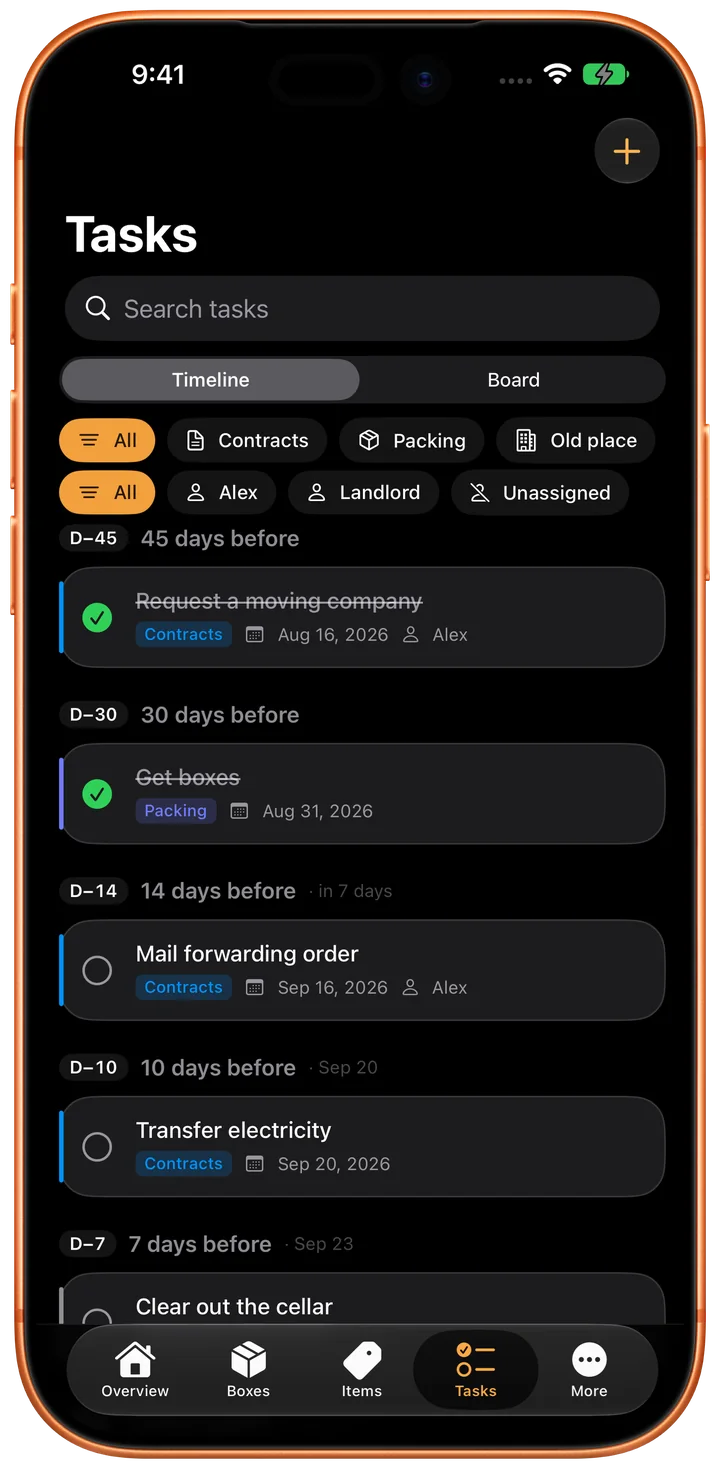
A taste of the timeline
These are 8 of the 58 tasks. The full timeline with every task, reminders and moving day in your calendar comes with the “Planning” module in the app, as a one-time purchase.
D−3535 days before
- Get moving boxes
0 of 8 packed
Know what's in every box
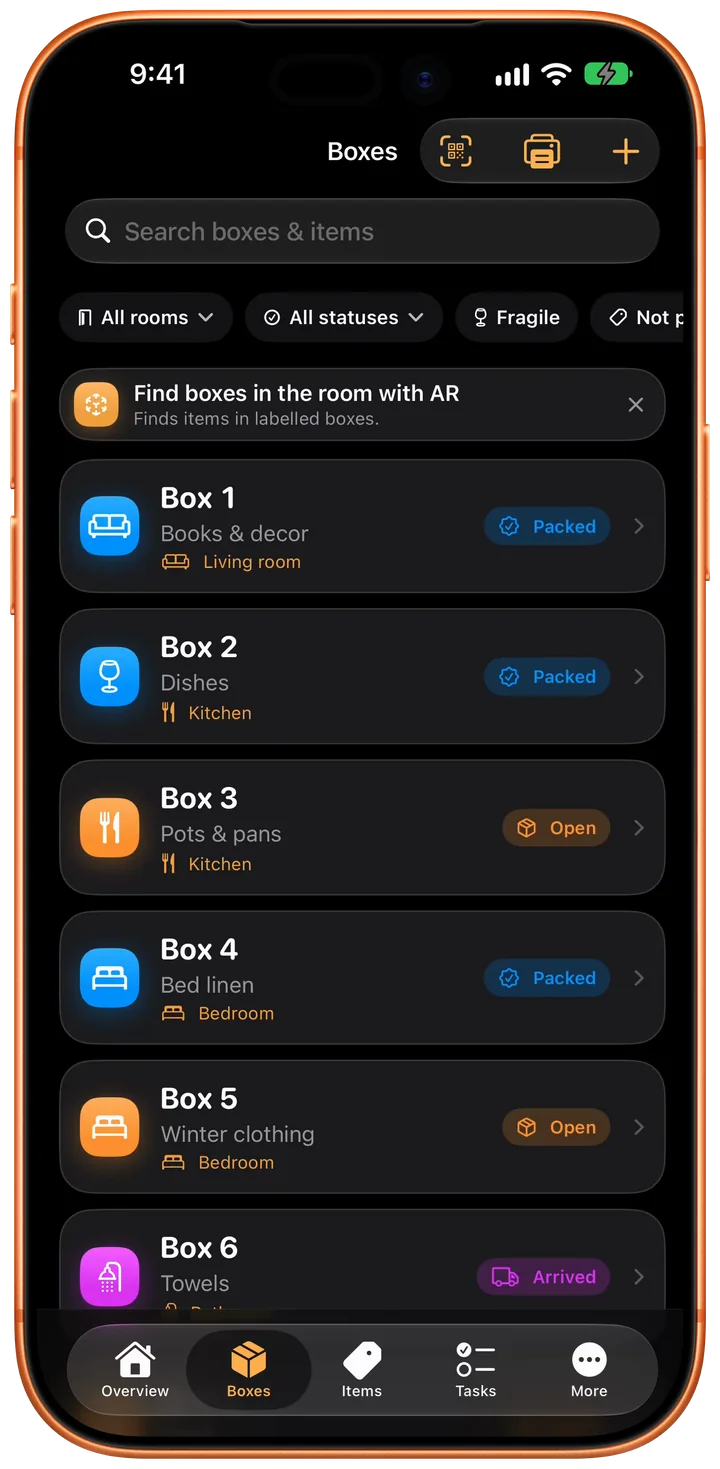
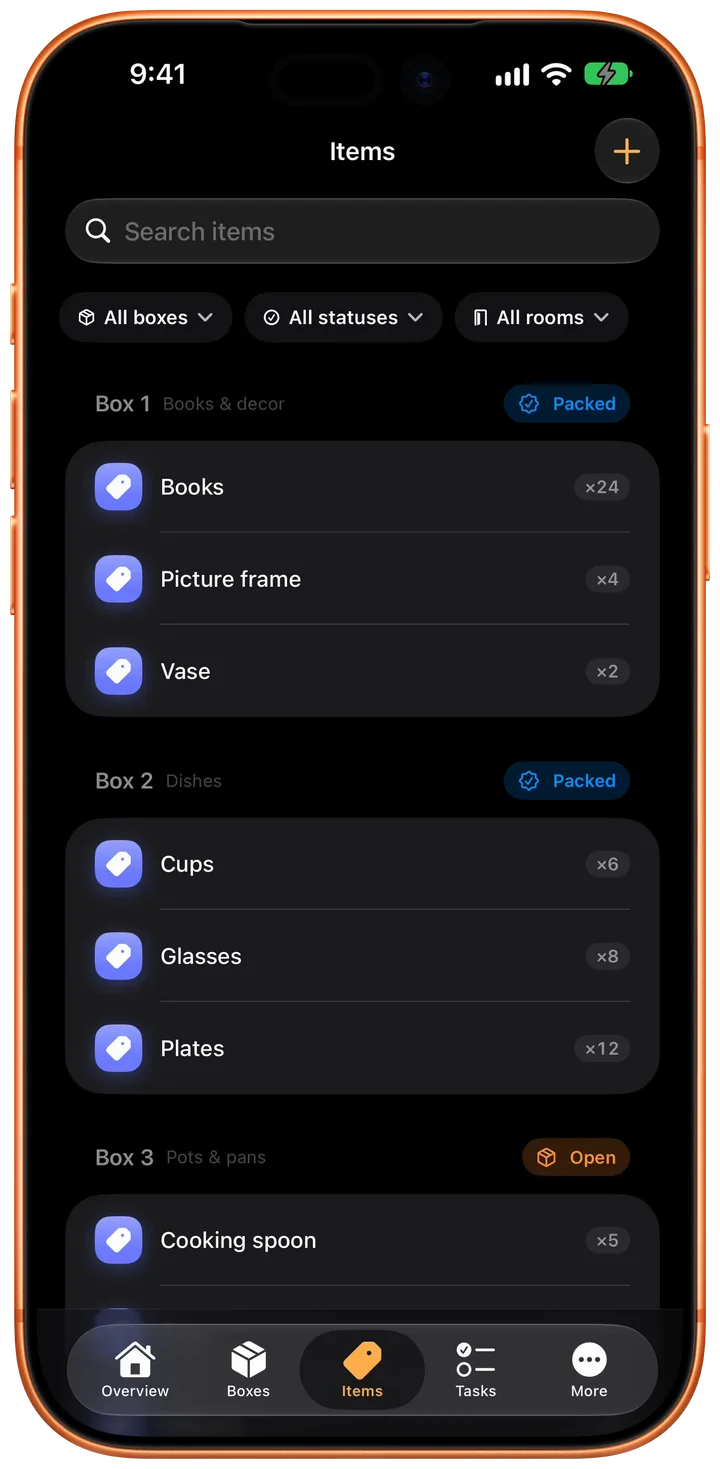
Number, room, status and photos. Photograph the contents instead of typing; recognition runs on your device.
Boxes and rooms
- Number, title, room and note per box
- Status from Open through Packed and Arrived to Unpacked
- Mark as fragile, attach photos
- Search across all boxes and their contents
Record contents without much typing
- Quick entry understands quantities: “4 plates” becomes 4x plates
- Photograph the contents, tap the recognised items, done
- Scan labels and lettering live with the camera
- Packing suggestions that match the room
D−1414 days before
- Pack seasonal and rarely used things
3 of 8 packed
Print a QR label for every box
Scan it and see what's inside.
- Print-ready labels with QR code, box number, title and room
- One scan opens the box right in the app, even from the system camera
- All labels at once as a PDF, you decide what goes on them
- Link bought QR stickers: the box is created when you scan

Note: Pots & pans
Contents list
- Kettle
- 3× Pot
- 2× Pan
- 5× Cooking spoon
- 6× Plates
- 4× Cups
- 4× Glasses
- Vase
D−55 days before
- Pack the kitchen, defrost the fridge
5 of 8 packed
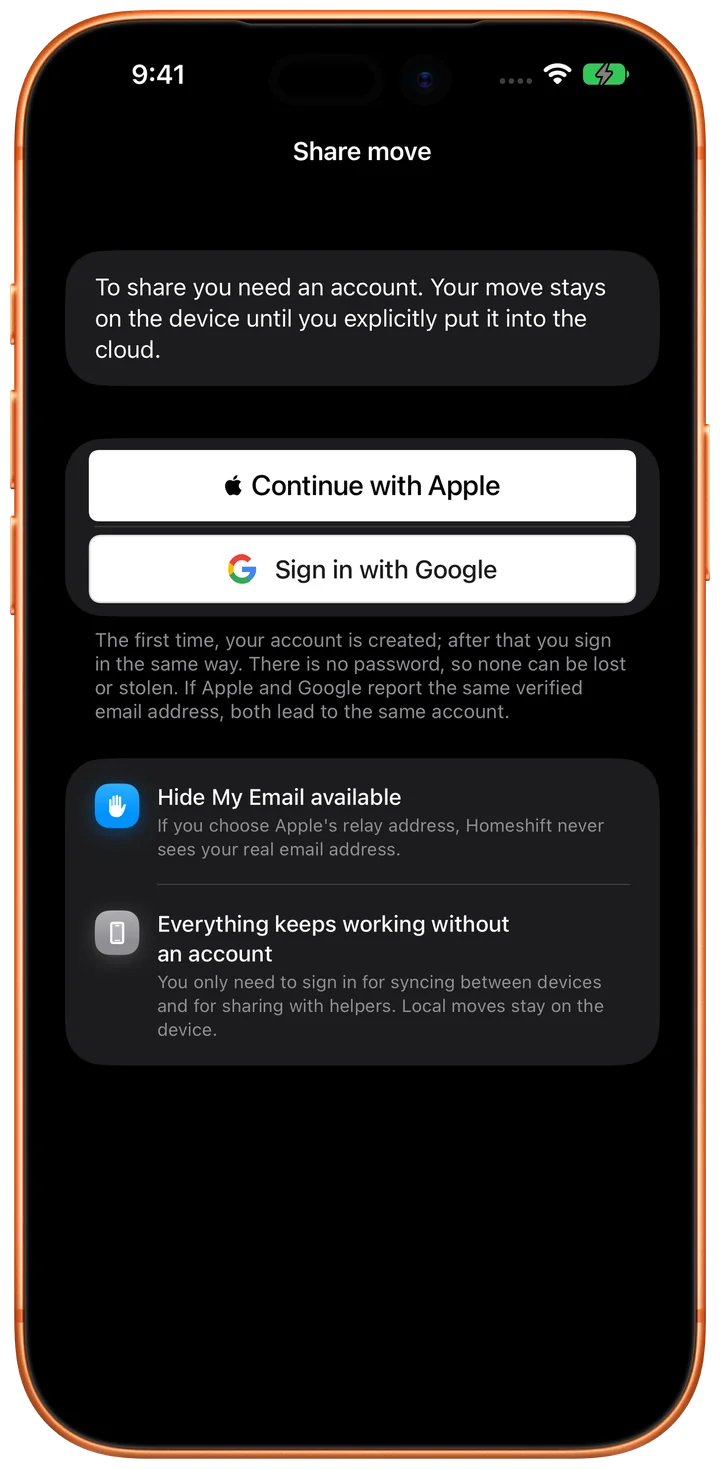
Pack together, stay in sync
Moving with a partner or friends? Put the move into Homeshift Cloud and invite them with a link or QR code. Changes show up on every device while you pack.
- Sign in with Apple or Google, no password
- Roles: edit or read only
- Photos only travel when you flip the switch
- Stop sharing any time, delete the account any time in the app
D0Moving day
- Final walk-through of the old flat
- Food and drink for the helpers
8 of 8 packed
Where is the kettle?
Eight boxes from the app's sample move. Search for an item and the right box speaks up, just like in Homeshift itself.
Box 1Packed
Books & decor · Living room
- 24× Books
- 4× Picture frame
- 2× Vase
Box 2Packed
Dishes · Kitchen
- 12× Plates
- 8× Glasses
- 6× Cups
Box 3Open
Pots & pans · Kitchen
- Kettle
- 3× Pot
- 2× Pan
- 5× Cooking spoon
- 6× Plates
- 4× Cups
- 4× Glasses
- Vase
Box 4Packed
Bed linen · Bedroom
- 2× Duvet
- 4× Pillow
- 6× Covers
Box 5Open
Winter clothing · Bedroom
- 8× Sweaters
- 3× Jackets
Box 6Arrived
Towels · Bathroom
- 10× Towel
- 2× Bath mat
Box 7Open
Tools · Cellar
- Drill
- Screwdriver set
- Hammer
Box 8Unpacked
Electronics · Living room
- 12× Cables
- Router
- 2× Speaker
D+11 day after
- Write up and submit the defects list
2 of 8 unpacked
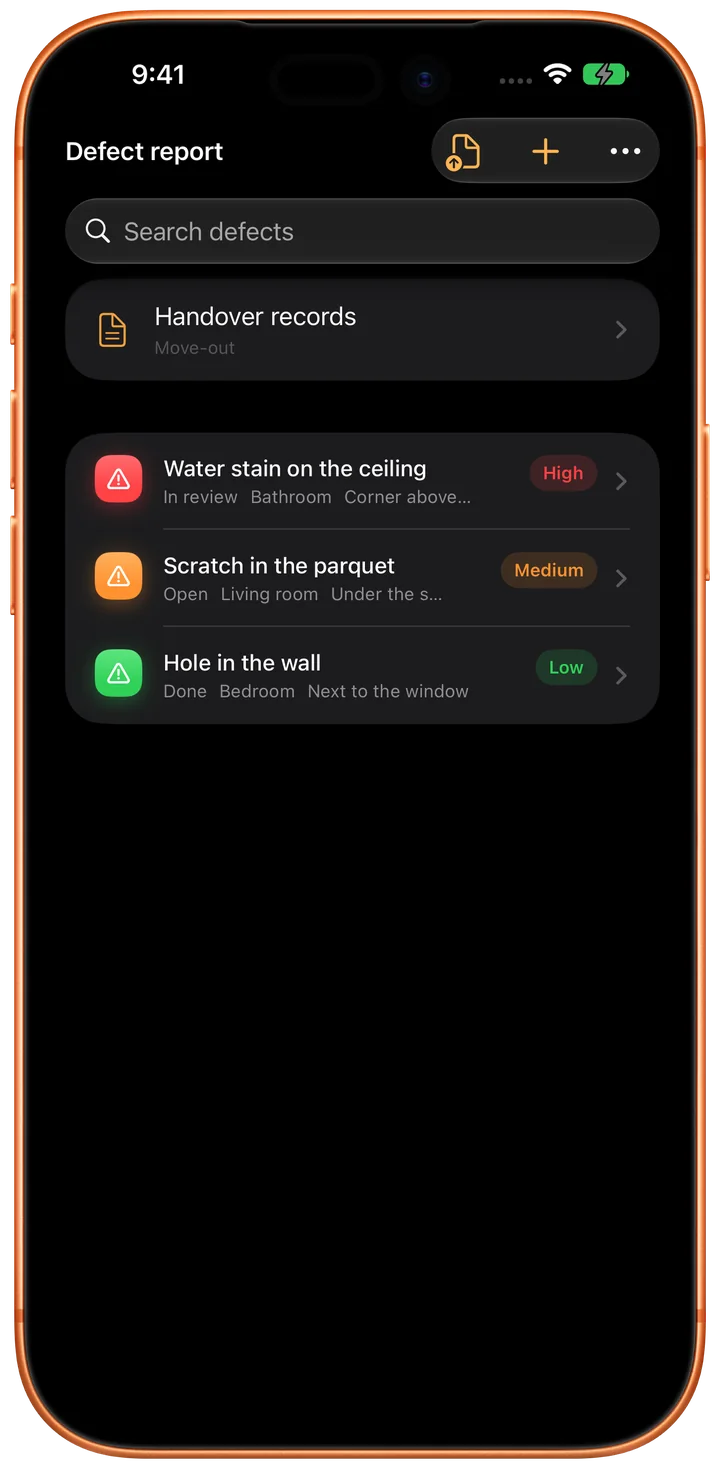
Document damage at the handover
For the handover: defects with severity and photos, exported as a PDF.
- Defects report for the handover, with severity, photos and PDF export
- Furniture list with a fate: take along, sell or dispose of
- Activity log: who changed what, and the way back
D+3030 days after
- Track the return of the deposit
8 of 8 unpacked
Even after the move is over
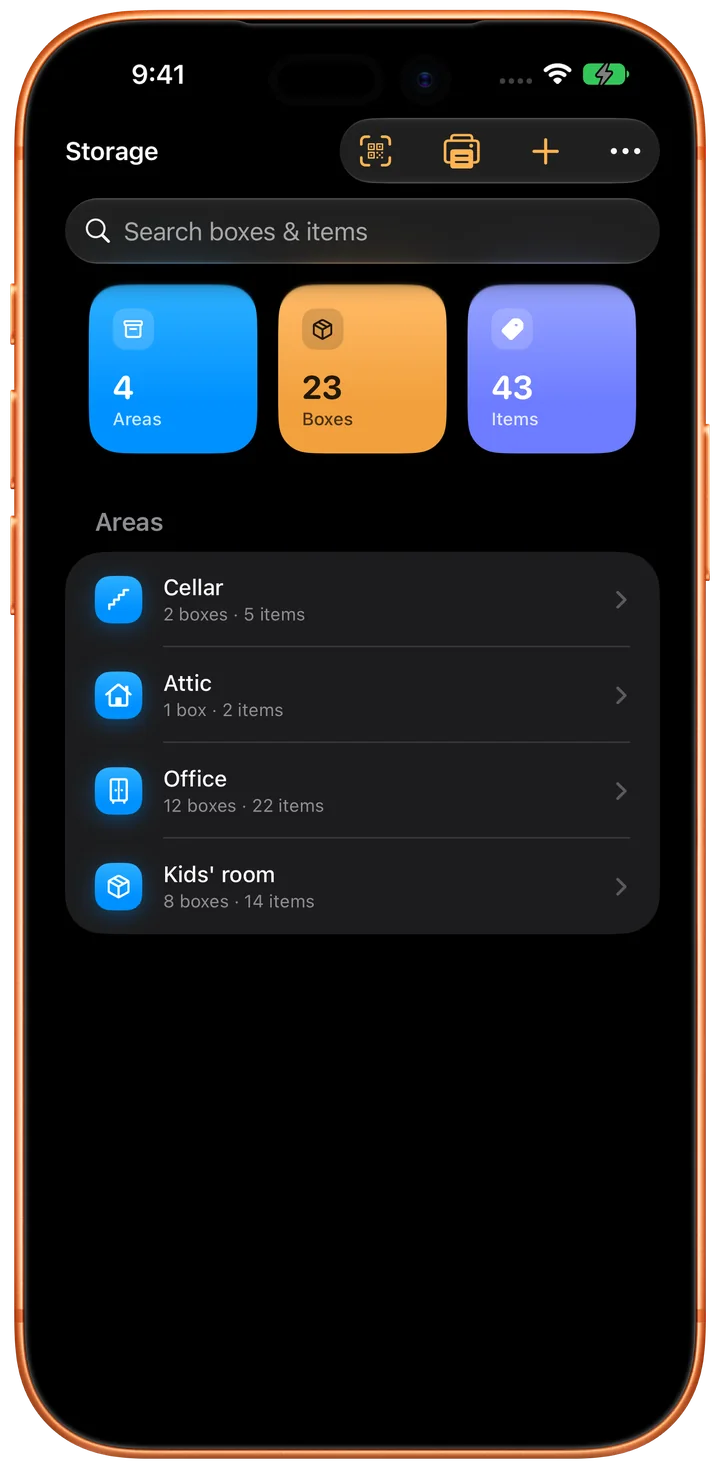
Your storage stays on the list
Cellar, attic and storage unit, separate from the move and with their own labels. Stays useful once the move is over.
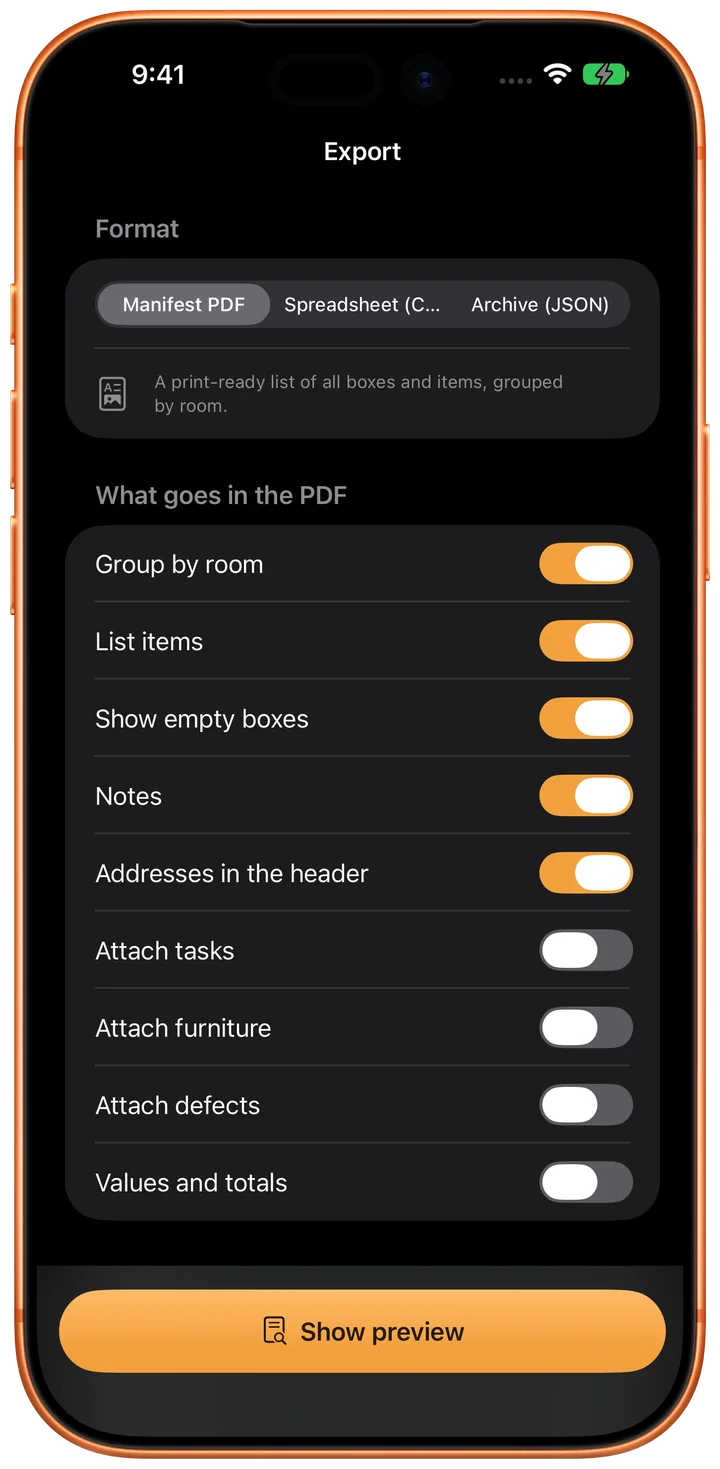
Export everything as PDF or CSV
PDF manifest, CSV table or JSON archive, any time and without an account. Optionally the private iCloud backup between your devices.
Homeshift features
Homeshift works locally first: boxes, items and photos live on your device, and the whole app works without an account and without internet. Everything beyond that you switch on yourself.
Boxes and rooms
- Number, title, room and note per box
- Status from Open through Packed and Arrived to Unpacked
- Mark as fragile, attach photos
- Search across all boxes and their contents
Record contents without much typing
- Quick entry understands quantities: “4 plates” becomes 4x plates
- Photograph the contents, tap the recognised items, done
- Scan labels and lettering live with the camera
- Packing suggestions that match the room
- Image recognition runs on the device. No photo leaves your iPhone.
QR labels to stick on
- Print-ready labels with QR code, box number, title and room
- One scan opens the box right in the app, even from the system camera
- All labels at once as a PDF, you decide what goes on them
- Link bought QR stickers: the box is created when you scan
Tasks with a schedule
- Suggestions for a whole move, sorted by paperwork, packing, old home, new home, moving day and after
- Due dates hang on moving day: if the date shifts, the task moves with it
- A date you set yourself stays where you put it
- Board with Backlog, Active and Done, drag and drop on the iPad
- Reminders as notifications, dates in your calendar
Not just boxes
- Furniture list with a fate: take along, sell or dispose of
- Defects report for the handover, with severity, photos and PDF export
- Storage for cellar, attic and storage unit, separate from the move and with its own labels
- AR mode to find boxes in a room
- Several moves side by side, switched with one tap
- Activity log: who changed what, and the way back
Move together, if you want to
- Sign in with Apple or Google, put the move into the cloud, invite helpers by link or QR
- Changes show up on every device while you pack
- Roles: edit or read only
- Photos only travel when you flip the switch
- Stop sharing any time, delete the account any time in the app
On the iPad
- A sidebar instead of a tab bar, list and detail side by side
- The same data as on the iPhone
Export and backup
- PDF manifest, CSV table or JSON archive
- Optional sync through your own iCloud account, photos included: between your devices, without an account with us
- Widget with a countdown to moving day and your packing progress
Local first
Homeshift works without an account and without internet. Image recognition runs on the device, no photo leaves your iPhone. No ads, no tracking.
At a glance
- Cost
- Free. One-time purchases and a subscription for the cloud, in the App Store.
- Account
- None needed. Only for sharing a move: with Apple or Google.
- Data
- On your device. Image recognition runs locally.
- Network
- Works without internet.
- Devices
- iPhone and iPad, iPhone Duo included.
- Ads
- No ads, no tracking.
Moving inventory for iPhone and iPad
Free. Your boxes, photos and lists stay on your device.